How to Build a Generative AI Application: Step-by-Step
Everyone is talking about generative AI like it’s a plug-and-play miracle. You just type a prompt, get a product, done. It’s not. That oversimplified version of the story is exactly why so many AI projects stall out somewhere between an exciting demo and a product real users can depend on. The truth is messier, more […]
Everyone is talking about generative AI like it’s a plug-and-play miracle. You just type a prompt, get a product, done. It’s not.
That oversimplified version of the story is exactly why so many AI projects stall out somewhere between an exciting demo and a product real users can depend on.
The truth is messier, more interesting, and honestly more useful to understand before you start building. You can’t simply make decisions about:
- What real mistakes to avoid
- What real technical hurdles trip up even experienced developers?
- Should you fine-tune a model or use one off the shelf?
- How do you stop your chatbot from confidently making things up?
- What happens when your app works beautifully for ten users but falls apart under real traffic?
If you have recently typed how to build a generative AI application and could not find the right answers, you have landed in the right place.
Regardless of whether you are a generative AI developer, a product manager, or a business owner, we can help you nail it.
In this write-up, we will share the nine easiest steps to build a generative AI application, along with its real challenges and the do’s and don’ts.
Let’s get into it.
TL;DR
To build your own generative AI application, you should start with a problem statement. After that, you will first choose a reliable model. From there, you research existing use cases and choose among an API, fine-tuning, or training from scratch. You design a clean data pipeline, craft and test prompts carefully. If possible, go for a lean first version, and test rigorously for accuracy and bias before launch. Once you are satisfied, you are good to go live and do maintenance as needed. Note: Unpredictable outputs, hallucinations, rising API costs, latency issues, data privacy concerns, bias, and scaling are challenges. DIY can be a bit tricky. If you want to skip months of trial and error, partnering with an experienced AI development company like Trango Tech is the way forward.
Key Takeaways
- Building a generative AI application needs a solid approach, experience, and expertise. Based on that, you will ideate, design, develop, and update as needed.
- Unreliable outputs, hallucinations, privacy issues, and biases are certain problematic aspects of this. You have to go the extra mile to deal with them and leave no stone unturned in terms of accuracy.
- Building a generative AI application costs anywhere from $15,000 to $500,000. It can go up or down based on model strategy, team location, and ongoing usage.
- In the end, you have to partner with an experienced AI development company. They will provide you with the right guidance and support. It is going to save months of costly trial and error
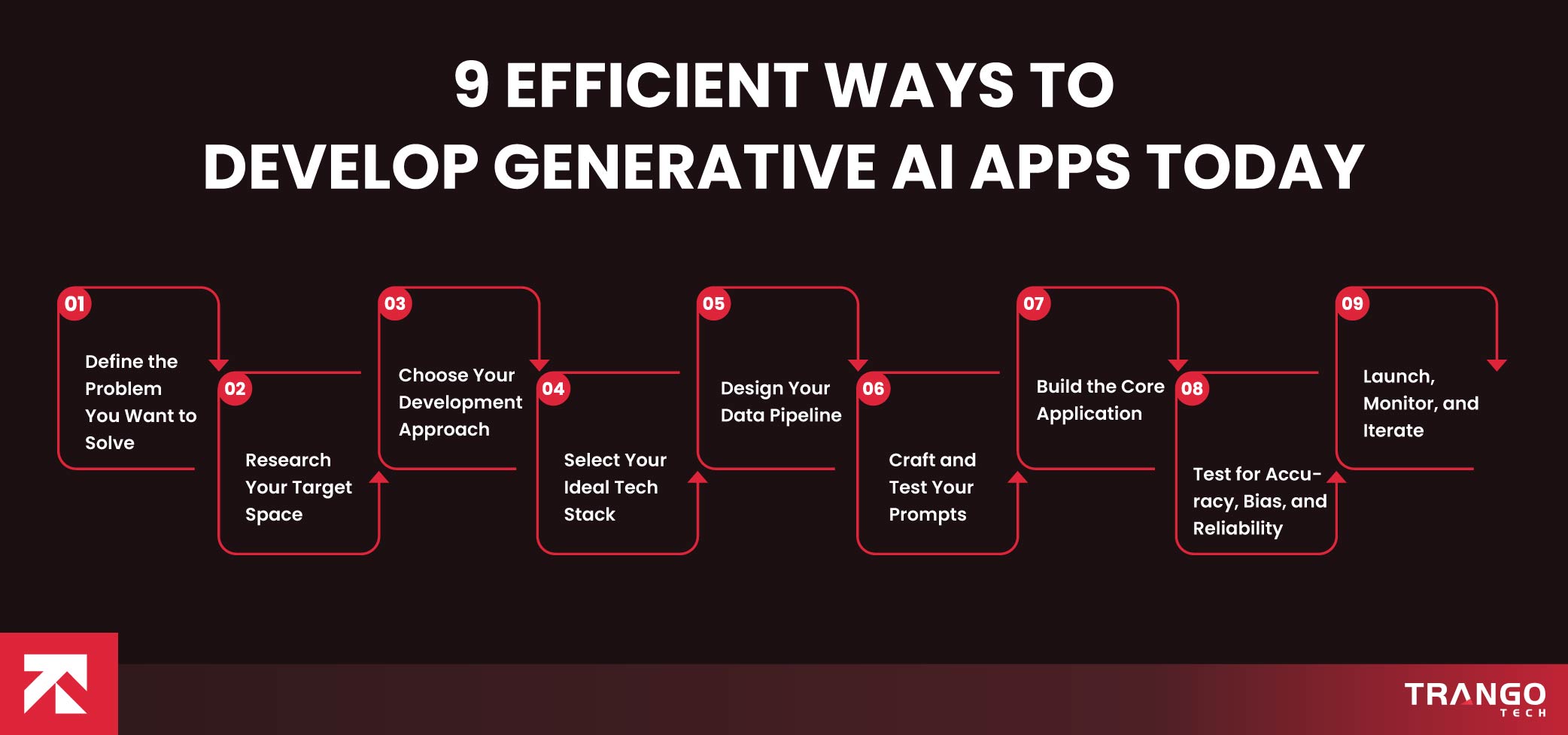
9 Efficient Ways to Develop Generative AI Apps Today
Generative AI apps are everywhere right now, but finding development experts who actually know how to build them well is still pretty rare.
Most of the companies simply chase the hype. They have zero real-world projects done before.
However, we have been mastering this since 2023. To date, our seasoned individuals have shipped 200+ applications, and dozens are already in the dev pipeline.
Reflecting on that experience, we have shared below a proven development process for generative AI applications.
Step 1: Define the Problem You Want to Solve
To develop an AI app, you have to first start with a problem that really exists. It can be anything; healthcare providers might automate medical imaging, while others seek it for advanced CX.
Apart from that, you should figure out exactly what your users need before you think about models, APIs, or architecture.
Be quite clear about all of it. Your exact purpose should be neither vague nor out of scope, as needed.
You can either summarize documents, generate images, write code, or answer customer questions.
Each of these applications of generative AI needs a different setup, and skipping any is why so far up to 95% of projects fail.
Step 2: Research Your Target Space
You should thoroughly research the market you are about to target. Ensure you know what similar AI solutions already exist.
Find out what they are good at, or what they lack. Primarily, the use of Generative AI applications is diverse.
It spans content creation, customer service, healthcare diagnostics, software development, and design tools.
Study how similar products work, note their weaknesses, and figure out where your app could genuinely do better.
Remember, never ever skip the research. It may look like doing something extra, but it will save you from wasting your time and effort on something that already exists.
Step 3: Choose Your Development Approach
When it comes to developing an AI, engineers have mainly three different ways forward. For instance, they can:
- Use an existing model via API.
- Fine-tune a pretrained model
- Train a model from scratch
What we suggest to most businesses is to use the Google Generative AI App Builder or API approach. It is quick and easy so that you get to test your idea first. If it works, you are good to go ahead.
Step 4: Select Your Ideal Tech Stack
Remember that the technologies you choose to work with will make or break your success throughout.
Now is the time to pick the best backend framework, database, and hosting setup.
Furthermore, pulling your information from documents or a knowledge base beforehand requires separate frameworks. For example, use Pinecone or Chroma for RAG.
Apart from that, avoid building everything manually. If needed, go for low-code options as well.
They are good for building search and conversational apps quickly. Choosing the right tools here saves you rework later.
Step 5: Design Your Data Pipeline
Regardless of whether you have to train or not, the pipeline is paramount at any cost. It is also important to keep your data clean and flowing through your app.
Before you proceed, see what data users provide, what data your app retrieves, and how that data gets formatted.
There should be clear-cut SOPs to ensure clean, consistent data reaches any model. If not, this will be the most common cause of a production break.
Step 6: Craft and Test Your Prompts
This is so far the most important yet ignored step in the development of an AI application.
You should give it more attention than it deserves. Give it a prompt to see how it functions.
One should see if there is reliable output quality. If not, they should enhance it as much as possible.
During this quality check, one should write clear instructions and add examples of ideal responses.
Then test how the model handles unusual or off-topic input. A well-designed prompt often matters more than the underlying model choice.
Step 7: Build the Core Application
When you feel ready to move forward, let’s get into the actual AI product development.
Your AI engineering will now connect your frontend to your backend, wire up your API calls, and create a working prototype.
Remember to keep the first version lean. Add loading states, error handling, and fallback behavior for when the model produces something unusable.
Step 8: Test for Accuracy, Bias, and Reliability
Initial tests you did were about the models; now it’s time to test the system as a whole. You should leave no stone unturned in terms of quality checks.
Since outputs vary, they aren’t always predictable; ensure you remain vigilant throughout this journey.
Note that there are certain quick checks we would recommend based on personal experience.
It spans assessment for hallucinations to see if the existing model states something false with total confidence.
Act as the independent user first and then check your AI. Don’t forget to omit any bias, primarily for niches like hiring or healthcare.
Last but not least, embed guardrails like content filters, where needed. Given the importance of data, a human should review before any response.
Step 9: Launch, Monitor, and Iterate
In the end, deploy your AI system on the intended platform, which can be an Apple Store, Play Store, or the web.
Set up logging so you can see what users ask for and how the model responds from time to time.
Given that data, you may use it to further enhance your prompts, adjust your model choice, and decide what to build next.
Also read: Explore 2026 AI development costs, unexpected line items, and ways to streamline your spend.
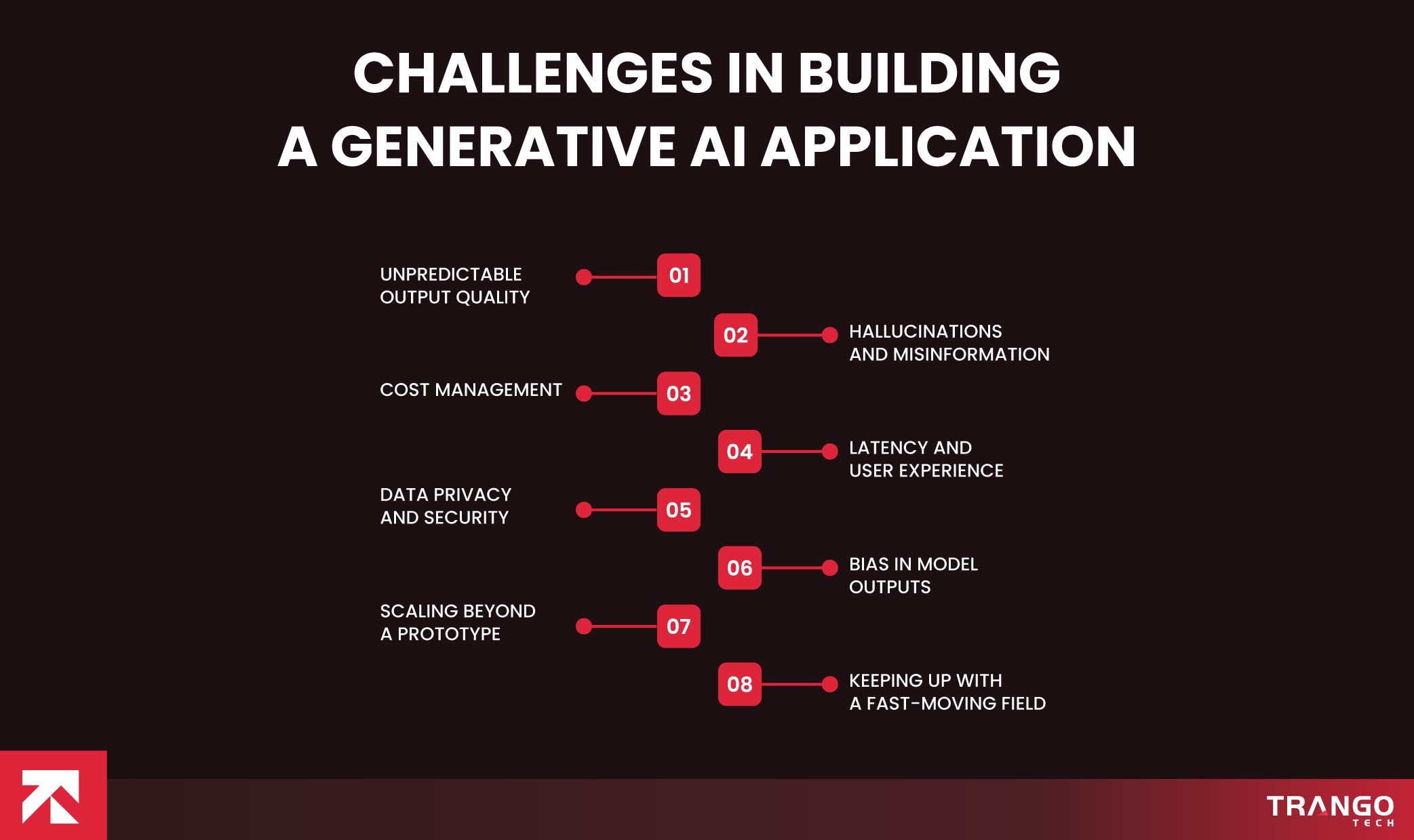
Challenges In Building a Generative AI Application
Though the process given above might look easy to read, it can be tricky once you start doing it.
No matter how good you do with a prototype, if you can’t build a genuinely reliable product, it is worth nothing.
In order to help you ace it, we have shed light on the challenges that may arise while you are up to develop an AI app.
Important: those who grasp them and keep them in check throughout have no chance of failure.
-
Unpredictable Output Quality
Generative AI isn’t always consistent, unlike traditional software. It’s very hard to do quality control. If you write one test case and say That’s enough, you will be in trouble, because something will be different every now and again, and you’ll need to test a variety of inputs.
-
Hallucinations and Misinformation
Sometimes models give information that may sound believable but isn’t.
This is a huge issue for any application where facts, medical, legal, or money advice are involved.
There are more than just the raw results to consider when creating a generative AI app for these areas.
You need to add fact-checking features, or you need a human in the middle.
-
Cost Management
API calls are not free and cost more as the number of calls. There are teams that do not plan their costs and end up being surprised at the actual traffic.
Record and track the use of tokens at the beginning, keep the calls to the more expensive model calls at the most suitable places, and store the repeated calls at the optimum places.
-
Latency and User Experience
Creating a generation will take time, and users will feel the delays. For a live product, it’s too long; it’s 8 seconds or 10 seconds.
Having some streaming output as it is generated will be of great assistance here, even if the overall processing time is the same.
-
Data Privacy and Security
Many uses of generative AI involve handling sensitive user information – whether it be personal data, business documents, or proprietary code.
Policies on sharing data with third-party APIs, keeping it in the system for an extended period, and using the data for further training on the models are important.
This is a poor way to go. Your legal and trust issues are soon to follow. The better you stay safe from it.
-
Bias in Model Outputs
Models learn from data containing real-world biases, and biases may be present in generated content.
It is a crucial factor in aspects such as job hiring, loan acceptance, health care advice, and much more.
These are detected before they can harm the system due to routine auditing of the outputs and through a variety of test cases.
-
Scaling Beyond a Prototype
A demo that works for 10 people does not necessarily work for 10,000. Infrastructure that seems to be okay when tested can crumble under normal use.
Don’t encounter surprises like rate limits, queues, and graceful degradation; plan for them!
-
Keeping Up With a Fast-Moving Field
New models, techniques, and tools are developed here on a regular basis. Best practices today must be reconsidered in 6 months.
Building a gen AI app does not just mean building the first MVP; it’s something that needs to be learned and rethought over and over in relation to technology choices.
Bonus read: Check out our list of the best AI development companies for businesses of all sizes in 2026.
Do’s and Don’ts of Generative AI Application Development
Hope the challenges we have discussed have made things easier for you. For your further ease, we are about to discuss do’s and don’ts to assist with this.
Just spare a few minutes and check out actionable do’s and don’ts. Keep this nearby as a gut-check.
For those who keep asking “how to develop AI applications”, this won’t replace careful planning. However, you can avoid a lot of the common mistakes before they cost you time or money.
| Area | Do | Don’t |
| Planning | Define a specific problem before choosing a model | Start building without a clear use case |
| Model Selection | Start with an existing API for speed and flexibility | Train a model from scratch unless you truly need to |
| Prompt Design | Test prompts against edge cases and unusual input | Assume one well-written prompt will always hold up |
| Data Handling | Keep your data pipeline clean and well-structured | Feed messy or inconsistent data into the model |
| Accuracy | Add fact-checking layers for sensitive use cases | Trust model output blindly in high-stakes areas |
| Bias | Audit outputs regularly across diverse scenarios | Assume the model is neutral by default |
| Cost | Track token usage and cache repeated queries | Ignore usage costs until the bill arrives |
| Performance | Use streaming responses to improve perceived speed | Make users wait on a blank screen for output |
| Security | Set clear policies on data retention and third-party use | Send sensitive user data without a privacy plan |
| Scaling | Plan for rate limits and load before you need them | Wait until traffic spikes to think about infrastructure |
| Iteration | Treat launch as the start, not the finish line | Assume version one is the final version |
Get Your Own Generative AI App Now!
Building a generative AI application takes the right approach, experience, and expertise to nail it. With all that in hand, the process ahead becomes much easier.
Just find a problem you are up to solve, design, develop, deploy, and then maintain it from time to time as needed.
Hallucinations, cost overruns, scaling issues, and bias may arise, but it is up to your expertise and how well you address them.
Taking all that into account, business leaders all over prefer to hire a generative AI development firm.
A reliable tech partner like Trango Tech will take care of all your technical needs. From prompt engineering to infrastructure scaling, we do it all.
Luckily, we already have 200 generative AI products and can do yours too. Our diverse industry experience is also very rare to find in the market.
If you are serious about turning your generative AI idea into a real, working product, you don’t have to figure it all out on your own.
Let Trango Tech bring the years of hard-earned lessons to your project, so you can skip the struggle and get straight to the results.
Questions readers ask us.
How to build a generative AI application without any AI experience?
Something good, and what really separates generative AI application development from conventional development, is DIY. No matter that, even if you don’t know the ABCs of ML, you can still do it. Just define a small, specific problem to solve and experiment with an existing API that is provided by a business like Anthropic or OpenAI. Most of these platforms have documentation and a sandbox where you can send a prompt and get a response in minutes. From there, you add in a backend, a simple frontend, and simple error handling. There is a learning curve, but it’s much easier than building a model from scratch, and it’s many non-technical founders who’ve shipped working AI products by adding on to existing infrastructures.
What's the difference between using an API and training my own generative AI model?
APIs are merely using a model that has been trained by a company that has access to massive amounts of compute and data, and you just send some prompts, and they give you some outputs. Creating a model from scratch is, however, arduous and requires a large volume of data, special machine learning hardware, and an understanding of the architecture of machine learning models. Most businesses and developers will want to use an API as it is faster, cheaper, and much more convenient. If you have a use case that no model can solve, it makes sense to train a new model, but otherwise, very few people should consider training a new model, as fine-tuning an existing model is often better.
How much does it cost to develop a generative AI application?
Before you ask how to make generative AI application, the most important thing to know is the cost associated with it. A production app that lots of thousands of people use could run you $100s or thousands of dollars a month, while a prototype might only cost you $10s per month. This is a variable cost that varies widely and is not a standard cost applicable to every project. Typically, in an API-based model, the API will charge usage fees, depending on the number of calls made and the volume of text or data used. If they want to fine-tune or train a custom model, the costs quickly ramp up with compute and data.
What are the most common applications of generative AI today?
The use of Generative AI applications is more widespread than you would imagine. It’s used in content creation tools to write articles, marketing copy, and social media posts. It can be used to create call center platforms that are used for customer service processes, to handle support tickets automatically. Developers use AI coding assistants that generate code, troubleshoot, and explain code as they write. In healthcare, generative AI can be applied to studying medical imagery, and even in drug development research. Use design software for generating image ideas, logos, and layouts from simple text input.
How do I prevent my generative AI app from generating false or misleading information?
This is one of the most complex issues in the entire industry, and there is no single corresponding solution that is going to completely eradicate the issue. The best strategy is to use multiple strategies, such as grounding your model’s responses in verified data through retrieval-augmented generation, adding layers of fact-checking for high-stakes content, and incorporating human review steps where output might be sensitive, such as health, legal, or financial information. Thoughtful crafting of your prompts is important too; you don’t want the model to guess, but to express uncertainty.
Which programming languages and tools are best for developing an AI application?
While most AI developers give preference to Python, there are several key reasons for this. It has rich libraries and a vibrant community that support the development of AI solutions. On the backend, lightweight frameworks such as FastAPI and Flask, which integrate well with AI APIs, are in use. If your app depends on documents or a knowledge base to deliver information, then vector databases like Pinecone, Chroma, or Weaviate come in extremely handy. At the front end, there are some common frameworks like React or Vue which work as usual, and the majority of the complexity of AI lies at the back end. If it suits you better to take a visual, low-code route to creating search and conversational applications, Google’s generative AI app builder is for you.
How long does it typically take to build and launch a generative AI application?
For developing an AI application, you should expect a timeline of a few days to 6+ months; that varies. The time required will be greatly influenced by what you are trying to create and how you do it. In the case of a well-defined problem, you will relatively need a simple prototype. It can be constructed in a couple of days to a couple of weeks (which is achievable) based on an existing API. Meanwhile, projects that need fine-tuning of the model or a custom data pipeline will take even longer because it will take longer to collect, clean, and prepare the data, train the model, and evaluate the results.
How do I make sure my generative AI application is secure and protects user data?
The first step in securing generative AI apps is purposeful intent regarding data sent to third-party APIs and its associated rationale. Define guidelines for the retention of data, its encryption, and whether or not the provider’s users’ data is used for additional model training. If you have sensitive data, you might want to consider enterprise agreements that have more robust data protection assurances from many API providers. Furthermore, ensure your API keys are properly secured, ensure all user input that reaches the model is properly validated, and store as little user information as possible. Prior to launch, it’s very worthwhile to have an experienced security reviewer, one with expertise in AI-specific risks.
Can small businesses realistically build their own generative AI applications, or do they need a development company?
Yes, small businesses can create generative AI applications, especially when it comes to less complex use cases, which rely on existing APIs. If the purpose is limited and coding skills are adequate, there are a lot of small teams already out there that have released basic AI products that don’t require outside individuals or companies. But as the use cases get more complicated, such as tuning models and processing sensitive data, you might need an expert firm to nail it. They will deploy the model and implement the proper safeguards against model bias and hallucination.
What should I do after launching my generative AI application to keep it improving?
Ensure that there are proper logs and that you can see what users are asking for and how your model is reacting to the requests. This will be your most important resource for improving the model. Review this data regularly, and if there are any patterns when asking a particular prompt, there are a lot of wrong answers or answers of low quality. Be aware of costs and latency as usage scales up because things that work well for a hundred users could get costly and slow when scaled to ten thousand users. Lastly, continue to stay updated on the bigger generative AI space, as new models and techniques come up all the time, and what is best practice today might change in a matter of months.